Streamlining RISE with SAP Connectivity using AWS Cloud WAN
Authors: Pablo Sánchez Carmona, Kenny Rajan, and Rozal Singh | Date: August 21, 2025
Categories: AWS Cloud WAN, Networking & Content Delivery, SAP on AWS, Technical How-to
Introduction
When deploying RISE with SAP, establishing network connectivity to RISE on Amazon Virtual Private Cloud (Amazon VPC) within Amazon Web Services (AWS) is your responsibility. Previously, users typically relied on AWS Site-to-Site VPN, AWS Direct Connect, Amazon VPC peering, or AWS Transit Gateway to connect on-premises systems and existing AWS accounts with the SAP-managed environment. Furthermore, organizations that have used AWS Cloud WAN to build, manage, and monitor their unified global network may want to synchronize RISE with SAP connectivity with their existing Cloud WAN architecture. With Cloud WAN, you can have a unified global network with consistent policy-based control capabilities, helping you simplify management, enhance security through traffic inspection, and maintain a consistent network strategy across the organization.
Cloud WAN is one of the network connectivity options for RISE with SAP that can be activated upon user request with the RISE with SAP team. Moreover, the connectivity patterns discussed in this post can also be applied to other third-party integrations following the same architecture as RISE with SAP.
Why Choose AWS Cloud WAN?
AWS Cloud WAN is a managed wide area networking (WAN) service that allows you to build, manage, and monitor a global network connecting resources across cloud and on-premises environments. This service provides a centrally managed network, helping reduce operational costs and complexity when operating a global network.
While AWS offers many powerful network connectivity services, Cloud WAN elevates network management capabilities to a new level by providing a global view and consistent policy-based control across the entire network. You can learn more about this service in the posts Introducing AWS Cloud WAN (where you can better understand the key components of the service) and Simplify global security inspection with AWS Cloud WAN service insertion (to understand how Cloud WAN simplifies security traffic inspection configuration).
However, the main question you might ask yourself is: what are the benefits of using Cloud WAN compared to other connectivity methods?
- Cloud WAN provides a dynamic global (multi-Region) network within AWS. This means any VPC in your Regions can automatically access RISE with SAP flexibly, regardless of which Region your SAP environment is created in.
- Centralized management and observation helps simplify the process of understanding complex networks and how they connect with your third-party connections.
- Transit Gateway allows you to self-define routing, propagations, and how attachments are mapped to route tables. Adding a new route table or attachment often leads to dozens of changes at lower layers. Cloud WAN allows you to use attachment tags and other metadata to automatically map attachments into segments, where you define relationships between segments through policy.
- When connecting with third-party solutions through VPC attachments, we recommend including traffic inspection between your environment and the third-party environment. Cloud WAN’s service insertion feature helps simplify routing configuration to establish this inspection process.
Architecture and Deployment Steps for RISE with SAP on AWS Cloud WAN
Now, after we have identified AWS Cloud WAN and its benefits, we can focus on integration with RISE with SAP. Figure 1 illustrates the architecture for connecting RISE with SAP using Cloud WAN in a multi-account environment. We have included an inspection layer using AWS Network Firewall to inspect traffic between RISE with SAP VPC and the rest of the environment. This architecture pattern also works when using any third-party firewall appliance combined with Gateway Load Balancer (GWLB).
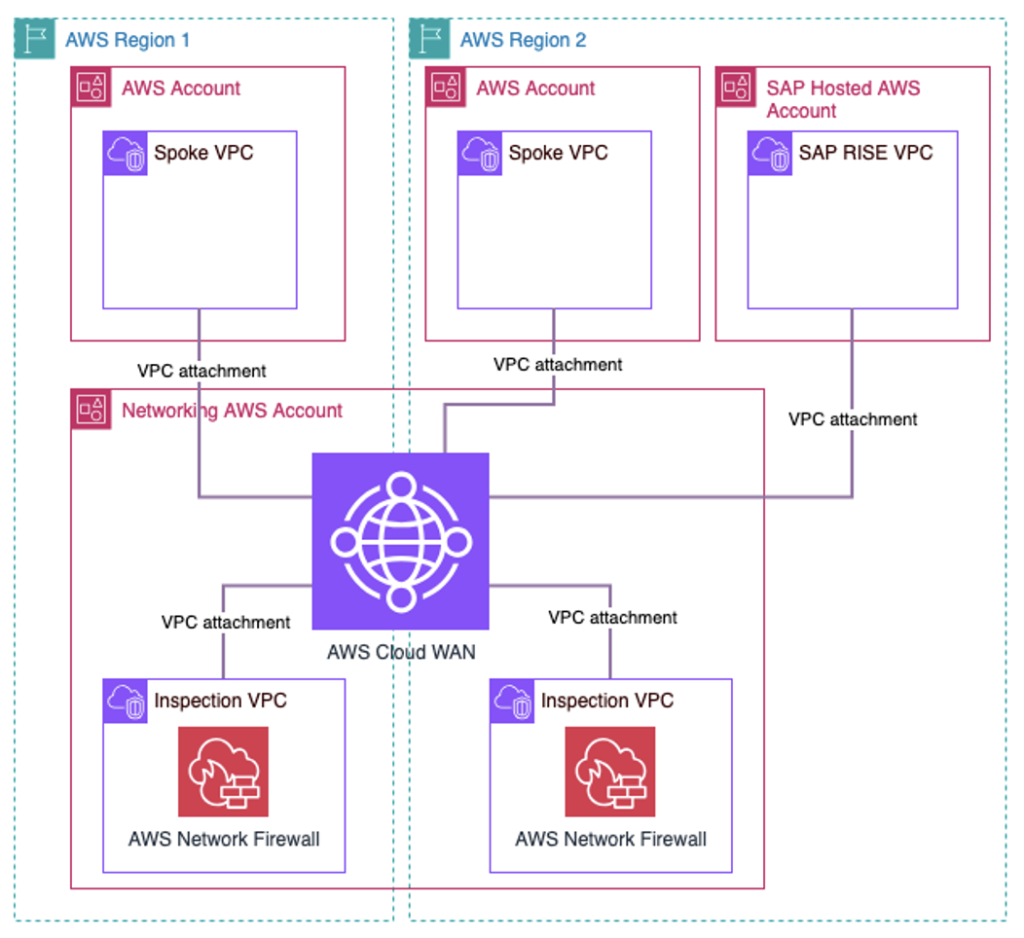
Figure 1. Overall Multi-Region and multi-account AWS Cloud WAN architecture connecting with RISE with SAP
The following steps outline the integration process for your AWS network (using Cloud WAN) with RISE with SAP. In this section, we focus on identifying the configuration steps of the integration process.
You need to create a Global Network and Core Network with a policy document that defines your network structure: AWS Regions, segments, routing actions, and attachment policies. Check the AWS documentation for more details about this setup.
We recommend using a dedicated segment specifically for RISE with SAP VPC connections. Minimal separation in Cloud WAN configuration — with VPCs connected to a separate segment — allows better control of routing configuration (adding inspection layers, creating static routes or blackholes, etc.).To follow best practices in including an inspection layer, you should deploy an Inspection VPC using Network Firewall or GWLB along with third-party security appliances. Additionally, your policy document needs to insert this firewall between your workloads and RISE with SAP VPCs.
Share the Core Network with the RISE with SAP account using AWS Resource Access Manager (AWS RAM). Check the documentation to understand how you can share resources through AWS RAM.
The Core Network is a global resource, so sharing must be done from the N. Virginia Region (us-east-1).Work with the RISE with SAP team to accept the shared Core Network invitation. The RISE with SAP team needs to perform the following actions:
- Accept the shared Core Network invitation.
- Configure VPC attachments to connect with the shared Core Network.
- Add necessary private network routes in the subnet route table to ensure seamless bidirectional communication.
This setup allows secure network sharing and ensures connectivity between the user’s AWS account environment and the RISE with SAP environment. Considerations include avoiding overlapping CIDR blocks, monitoring data transfer costs, regularly reviewing firewall rules, and using AWS CloudTrail for audit purposes.
Best Practices When Deploying AWS Cloud WAN for RISE with SAP
In this section, we focus on best practices when integrating RISE with SAP with your network based on AWS Cloud WAN. This content includes both policy document configuration and firewall rules that need to be deployed.
We can review a complete policy document deployed consistent with the architecture illustrated in Figure 2. We use this example to highlight important best practices and key parts of the policy document.
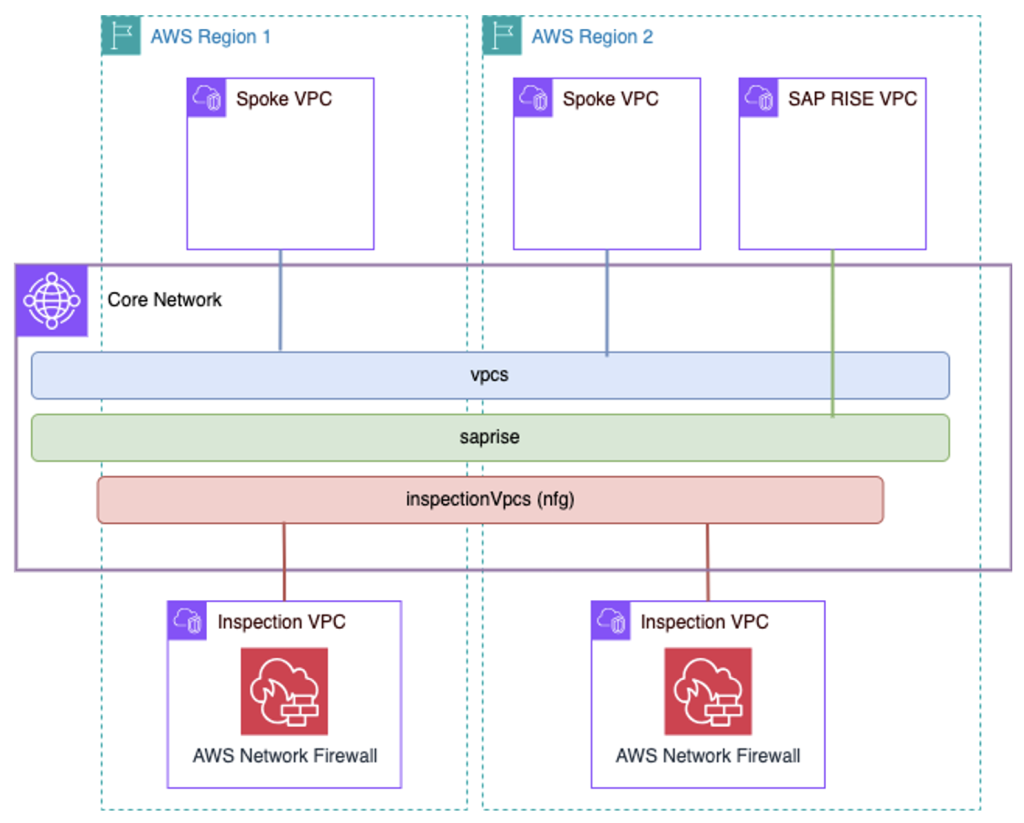
Figure 2. Example AWS Cloud WAN architecture with an inspection layer between AWS workloads and RISE with SAP.
{
  "version": "2021.12",
  "core-network-configuration": {
    "vpn-ecmp-support": true,
    "asn-ranges": ["64496-64500"],
    "edge-locations": [
      {
        "location": "us-east-1",
        "asn": 64496
      },
      {
        "location": "eu-central-1",
        "asn": 64497
      }
    ]
  },
  "segments": [
    {
      "name": "vpcs",
      "require-attachment-acceptance": false
    },
    {
      "name": "saprise",
      "require-attachment-acceptance": true,
      "isolate-attachments": true
    }
  ],
  "network-function-groups": [
    {
      "name": "inspectionVpcs",
      "require-attachment-acceptance": true
    }
  ],
  "segment-actions": [
    {
      "action": "send-via",
      "segment": "vpcs",
      "mode": "dual-hop",
      "when-sent-to": {
        "segments": ["saprise"]
      },
      "via": {
        "network-function-groups": ["inspectionVpcs"]
      }
    }
  ],
  "attachment-policies": [
    {
      "rule-number": 100,
      "condition-logic": "and",
      "conditions": [
        {
          "type": "attachment-type",
          "operator": "equals",
          "value": "vpc"
        },
        {
          "type": "tag-exists",
          "key": "domain"
        }
      ],
      "action": {
        "association-method": "tag",
        "tag-value-of-key": "domain"
      }
    },
    {
      "rule-number": 200,
      "condition-logic": "and",
      "conditions": [
        {
          "type": "attachment-type",
          "operator": "equals",
          "value": "vpc"
        },
        {
          "type": "account-id",
          "operator": "equals",
          "value": "XXXXXXXXXXXX"
        }
      ],
      "action": {
        "association-method": "constant",
        "segment": "saprise"
      }
    },
    {
      "rule-number": 300,
      "condition-logic": "and",
      "conditions": [
        {
          "type": "tag-value",
          "operator": "equals",
          "key": "nfg",
          "value": "inspectionVpcs"
        }
      ],
      "action": {
        "add-to-network-function-group": "inspectionVpcs"
      }
    }
  ]
}
In the following steps, we will analyze the key components and best practices:
Network Segment Definition
We recommend using a separate segment dedicated to RISE with SAP VPCs. This approach allows you to maintain independent routing control for these VPCs and the rest of the environment. In the case of the “saprise” segment, we configure the isolate-attachments option, so that attachments in that segment cannot communicate with each other by default.
"segments": [
  {
    "name": "vpcs",
    "require-attachment-acceptance": false
  },
  {
    "name": "saprise",
    "require-attachment-acceptance": true,
    "isolate-attachments": true
  }
],
Traffic Inspection and Cloud WAN Service Insertion
After setting up network segments, consider the following recommendations to enhance Cloud WAN configuration for RISE with SAP:
- Deploy a firewall layer to protect traffic between RISE with SAP VPCs and other workloads connected via Cloud WAN. To do this, create a Network Function Group (NFG) to use the service insertion functionality.
"network-function-groups": [
  {
    "name": "inspectionVpcs",
    "require-attachment-acceptance": true
  }
],
- The service insertion routing action to inspect traffic between segments is called send-via. In our example, the dual-hop option allows cross-Region traffic inspection at both AWS regions that traffic passes through. Another option is to use single-hop, which allows traffic inspection in only one region (you can also choose which AWS region to use). You can access the AWS documentation to learn more about how this mechanism works.
"segment-actions": [
  {
    "action": "send-via",
    "segment": "vpcs",
    "mode": "dual-hop",
    "when-sent-to": {
      "segments": [
        "saprise"
      ]
    },
    "via": {
      "network-function-groups": [
        "inspectionVpcs"
      ]
    }
  }
],
Configure Attachment Policies
New attachments in Cloud WAN will automatically be associated with a segment or NFG by using attachment-policies in the policy document. From attachments, you can retrieve metadata (such as tags, attachment type, AWS account, or AWS Region) to define granular policies and specify how a new attachment will be assigned to a segment in the network. We can focus on rule number 200 as an example to delve into this capability.
- For RISE with SAP VPCs, the recommendation is to use the SAP Account ID as metadata to automate the attachment association process. In the code snippet below, you should replace the placeholder “XXXXXXXXXXXX” with the actual Account ID.
- Additionally, use the require acceptance flag to add an additional manual control layer when creating associations.
{
  "rule-number": 200,
  "condition-logic": "and",
  "conditions": [
    {
      "type": "attachment-type",
      "operator": "equals",
      "value": "vpc"
    },
    {
      "type": "account-id",
      "operator": "equals",
      "value": "XXXXXXXXXXXX"
    }
  ],
  "action": {
    "association-method": "constant",
    "segment": "saprise"
  }
}
Additional Considerations
Configuring Firewall Rules
When configuring firewall rules, consider the specialized ports for RISE with SAP to allow traffic from your workloads to the RISE with SAP VPC. For more details about deployable firewalls, refer to the post Securing SAP with AWS Network Firewall part-2 managed rules.
- RFC Connections (BAPI and IDoc): Port 33xx (where xx is your instance number)
- HTTPS for OData and REST/SOAP: Ports 443, 44300
- ODBC/JDBC for SAP HANA connections: Port 3xx15 (where xx is your instance number)
- Other necessary ports:
- 44301–44302: Client and SAP AS connections
- 3201–3202: Client and SAP AS connections
- 8001–8002: Client and SAP AS connections
- 3600: If using load balancing with message server
- 3299: SAProuter service
- 3200–3299: SAP Connector
- 3300–3399: SAPGUI
Monitoring and Maintenance
Use AWS Network Manager to monitor and manage your Core Network:
- Set up alerts for network issues and policy violations
- Configure dashboards to observe network status
- Enable logging for troubleshooting and ensuring compliance
Implement regular maintenance procedures for:
- Regularly reviewing firewall rules
- Updating network configuration
- Making configuration changes when necessary
Conclusion
AWS Cloud WAN provides a streamlined approach to connecting your environment with RISE with SAP on AWS. A unified global network with consistent policy-based control helps you simplify management, enhance security through traffic inspection, and maintain a consistent network strategy across the organization.
This configuration allows secure network sharing and maintains stable connectivity between your AWS account and the RISE with SAP environment, whether you’re using an existing Cloud WAN or setting up a new one.
To learn more about AWS Cloud WAN and RISE with SAP connectivity options, visit the AWS Cloud WAN documentation and RISE with SAP on AWS documentation.
About the Authors
Pablo Sánchez Carmona
 Pablo is a Senior Network Specialist Solutions Architect at AWS, where he helps customers design secure, scalable, and cost-effective network systems. When not talking about networking, Pablo enjoys playing basketball or video games. He holds an MSc in Electrical Engineering from the Royal Institute of Technology (KTH) in Sweden and a Telecommunications Engineering degree from the Polytechnic University of Catalonia (UPC).
Kenny Rajan
 Kenny is a Principal Enterprise Architect at AWS, specializing in integrating Generative AI with enterprise and marketing systems like SAP and Adobe. He helps organizations modernize their digital experience platforms, supply chains, and backend systems through data-driven and AI-powered cloud solutions. Outside of work, Kenny contributes to technology education and charitable activities.
Rozal Singh
 Rozal is a Principal Solutions Architect specializing in SAP at AWS. With over 18 years of experience in the SAP field, he has expertise in guiding customers through their cloud transformation journey, particularly in migrating and optimizing SAP systems on AWS. In his current role, Rozal collaborates with enterprise customers to develop and deploy comprehensive cloud strategies, ensuring success for digital transformation initiatives while maximizing return on investment in AWS and SAP technologies. His commitment to innovation and customer success has made him a trusted advisor in the enterprise technology field.
Original Article Source: AWS Networking & Content Delivery Blog